System design
A pragmatic architecture built around operational constraints.
The system works with today’s file-based reality while creating clean boundaries for future ERP and banking APIs.
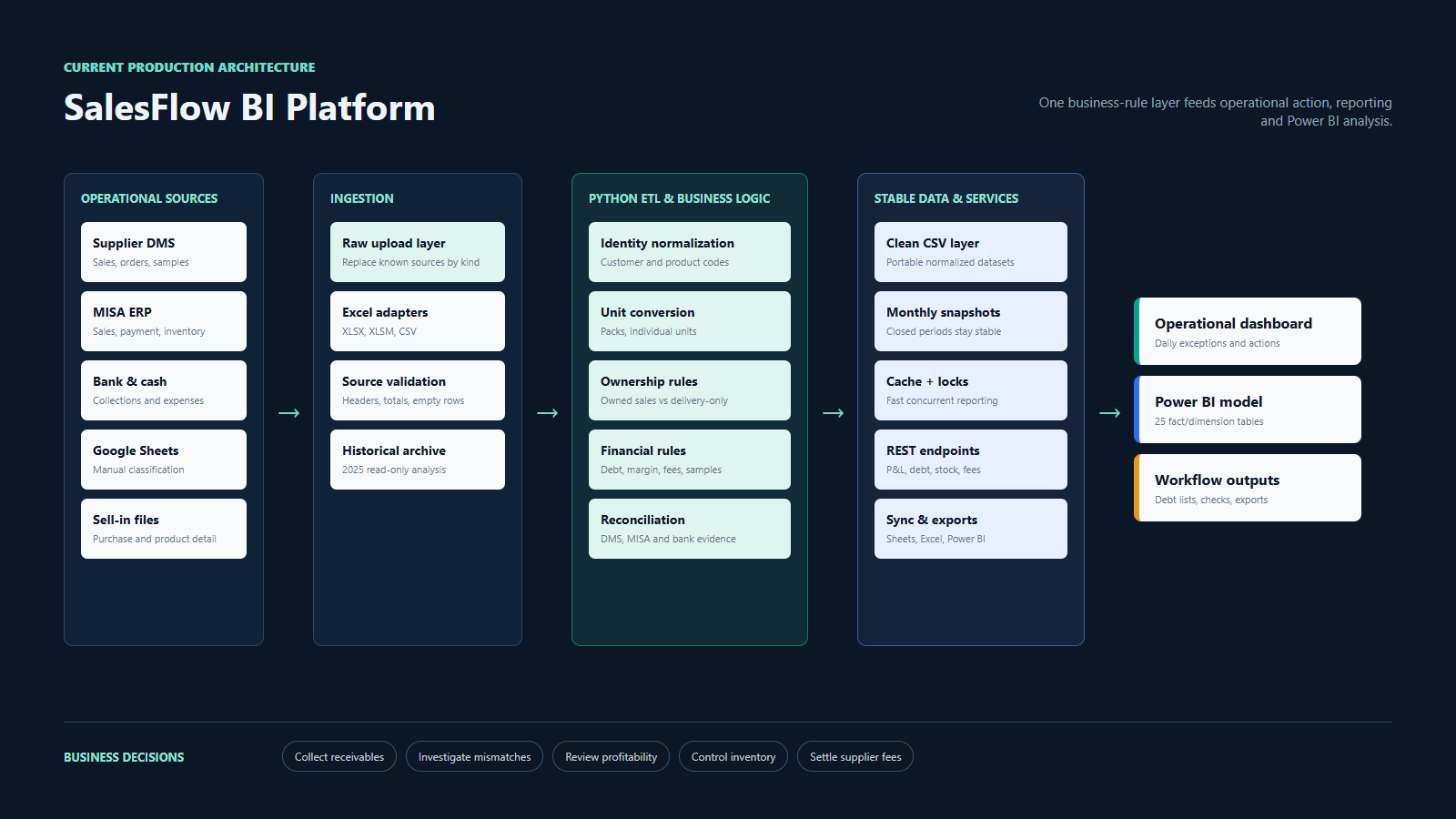
Data pipeline
Six layers, one source of business logic
The operational dashboard and Power BI do not invent separate formulas. Both consume outputs derived from the same Python rules.
Reporting flow
Fast daily refresh, stable closed months
Power BI receives a model, not a pile of source files.
The export layer currently produces 25 fact and dimension tables. It separates customer, product, channel and date dimensions from monthly P&L, inventory, cashflow, receivables, price audit and supplier fee facts.
dim_dateShared monthly and calendar attributes.
dim_customerCustomer, channel and delivery classification.
fact_pnl_monthlyRevenue, margin, expenses, inventory and assets.
fact_receivables_monthlyCustomer-month debt and collection type.
fact_inventory_movementsSell-in, sell-out and balance movement.
fact_discount_ncc_monthlySupplier settlement components by month.
Engineering choices
Deliberate trade-offs
Files before APIs
The business already has reliable exports. The architecture improves the process now without waiting for vendor API access.
Snapshots before databases
Closed-month CSV snapshots provide stable history with low operational overhead at current scale.
Plain frontend before framework
A focused HTML/CSS/JS client remains fast, portable and easy to deploy on shared hosting.
Cache with invalidation
Heavy Excel calculations are cached and protected with locks because multiple reports load concurrently.
Relative paths
The project can move between Windows, cPanel and another machine without hard-coded user directories.
One logic layer
The app stays authoritative; Power BI consumes exported clean tables instead of rebuilding business rules.